How to Create Viral Wall Puzzle AI Photos with ChatGPT
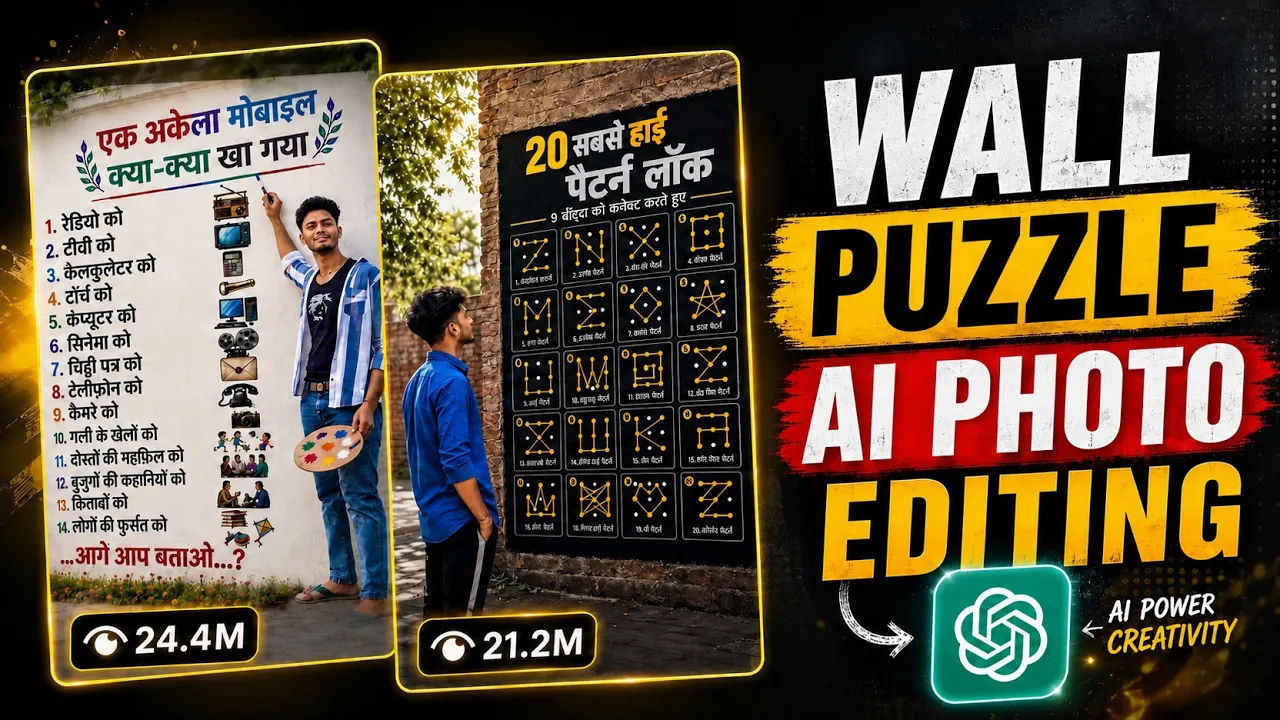
If you’ve been scrolling through Instagram lately, you’ve probably noticed a new trend taking over the platform—wall puzzle AI photos. These creative images are getting millions of views, and many creators are using them to grow their Instagram pages quickly.
The best part? You can create these viral images in just a few minutes using ChatGPT and a single photo of yourself.
In this guide, I’ll show you the complete process step by step.
Why Are Wall Puzzle AI Photos Going Viral?
This unique AI image style makes it appear as though your portrait is built into a giant wall puzzle. The realistic effects and artistic look make these images highly shareable, which is why they perform so well on Instagram Reels, Posts, and even Pinterest.
Many creators are already receiving millions of views by uploading these AI-generated images.
If you want to join the trend, follow the steps below.
Step 1: Install the ChatGPT App
First, download the official ChatGPT application from the Google Play Store or Apple App Store.
Official Website:
https://chatgpt.com/
Android App:
https://play.google.com/store/apps/details?id=com.openai.chatgpt
iPhone App:
https://apps.apple.com/app/chatgpt/id6448311069
Once installed:
- Open the app.
- Sign in using your Google account, Apple ID, or email.
- After logging in, you’re ready to create AI images.
Step 2: Upload Your Photo
Inside the ChatGPT app:
- Tap the “+” (Plus) button.
- Select Photo.
- Choose a clear image from your gallery.
A high-quality portrait with good lighting will usually generate the best results.
Step 3: Paste the AI Prompt
After uploading your image, simply paste the AI prompt into the message box.
Prompt:- Ultra-realistic cinematic street photography of a long weathered white concrete wall beside a quiet roadside, covered with natural dirt stains, moss, and realistic texture. A large viral-style motivational poster is painted directly on the wall with elegant black floral corner borders and minimal decorative elements. At the top center is a small open-book icon. Bold Hindi text reads: “इसने ही Instagram बनाया था इसके लिए दो शब्द..? Typing…” The word “Instagram” is highlighted in bright red, and “Typing…” is written in bold red font. Below the text are small emoji icons: 700. At the lower left side of the wall is a high-quality realistic portrait of a young businessman in a black suit, white checkered shirt, and black tie, blended naturally into the wall like a mural. On the right side, standing with his back facing the camera, wearing a brown full-sleeve shirt, blue loose-fit jeans, and white-black slide sandals, looking at the wall as if reading the question. Bright afternoon sunlight filters through
If you want to customize the puzzle design, you can easily edit the prompt before generating the image.
For example, you can change:
- Puzzle color
- Wall texture
- Background style
- Puzzle shape
- Artistic lighting
This allows you to create completely unique images.
Step 4: Generate the AI Image
Once everything is ready:
- Tap the Send button.
- Wait a few moments while ChatGPT generates your AI artwork.
The generation process usually takes less than a minute, depending on server load.
Step 5: Download Your Image
After your AI image is generated:
- Tap the Download icon.
- The image will be saved to your device in high quality.
Now it’s ready to upload to Instagram, Facebook, Threads, Pinterest, or any other social media platform.
Tips to Make Your AI Photos Go Viral
To improve your chances of getting more engagement:
- Use a high-quality selfie.
- Generate unique puzzle designs instead of copying others.
- Upload in HD quality.
- Add trending Instagram hashtags.
- Post consistently.
- Use an eye-catching caption.
Original content always performs better than copied images.
Best Prompt Customization Ideas
You can modify the prompt to create different styles, such as:
- Golden Puzzle Wall
- Wooden Puzzle Art
- Neon Puzzle Design
- Marble Wall Puzzle
- Luxury Puzzle Portrait
- Stone Wall Puzzle Effect
- Fantasy Puzzle Background
- 3D Puzzle Wall
Experimenting with different styles can make your content stand out from thousands of similar posts.
Helpful AI Resources
Here are some useful tools and resources that can improve your AI creations:
- ChatGPT: https://chatgpt.com/
- OpenAI Image Generation Guide: https://help.openai.com/
- Instagram Creators: https://creators.instagram.com/
- Canva (for adding text and finishing touches): https://www.canva.com/
- Adobe Express: https://www.adobe.com/express/
Final Thoughts
That’s it! You now know how to create the trending wall puzzle AI photos that are currently going viral on Instagram.
Simply install the ChatGPT app, upload your photo, paste the AI prompt, customize it if needed, and generate your unique artwork in just a few clicks.
With a little creativity and consistency, you can create eye-catching AI images that have the potential to reach thousands—or even millions—of people on social media.
If you found this tutorial helpful, keep experimenting with different AI prompts and image styles to stay ahead of the latest Instagram trends. Happy creating!