How to Create Trending Shayari Reels in VN Editor (Step-by-Step Guide for Viral Instagram Videos)
“Never keep looking back at the life you’ve already lived. Whatever is meant to happen will happen. Don’t waste today’s happiness worrying about tomorrow.”
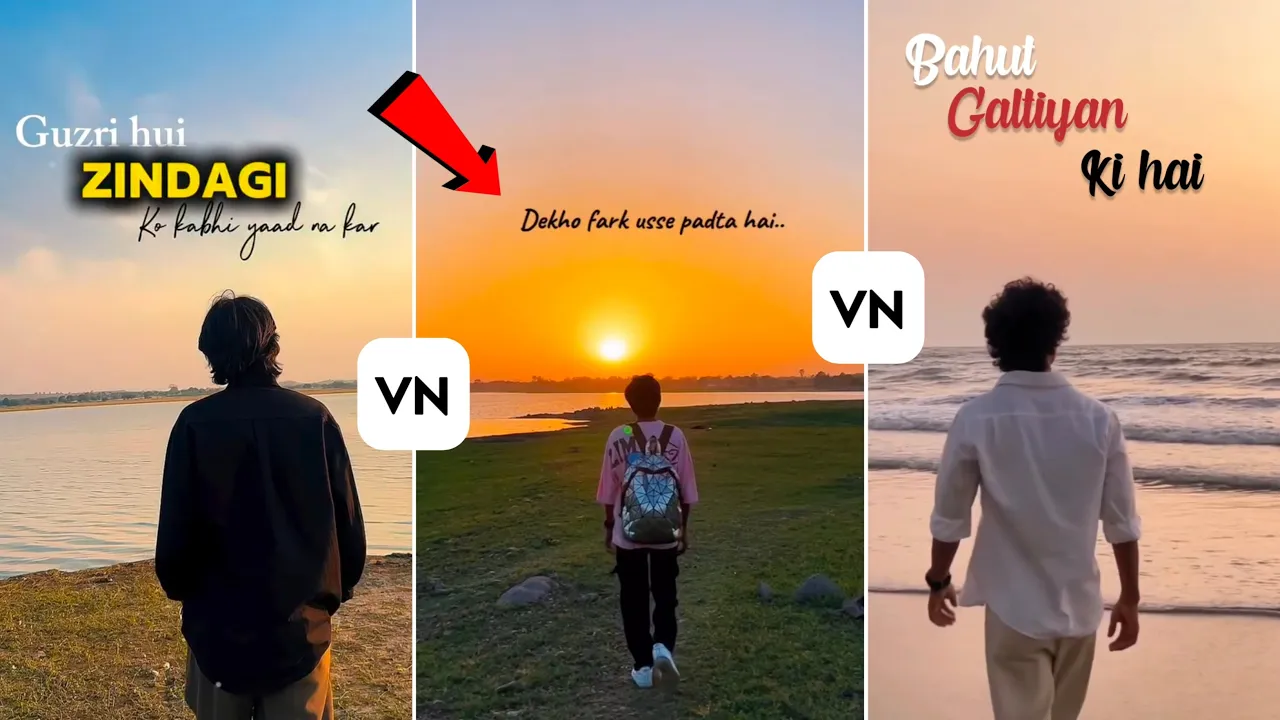
Emotional Shayari Reels have become one of the biggest trends on Instagram. These videos connect with people’s emotions, making them highly shareable and increasing the chances of going viral. If you’ve been wondering how creators make these cinematic Shayari Reels with smooth text animations and emotional visuals, you’re in the right place.
In this tutorial, I’ll show you how to create a professional Trending Shayari Reel using the VN Video Editor. The best part? It’s completely beginner-friendly, and I’ll explain everything step by step.
Why Shayari Reels Go Viral
One reason these reels perform so well is because they evoke emotions. Whether it’s friendship, heartbreak, motivation, or life lessons, people naturally connect with relatable Shayari. When paired with cinematic visuals and smooth editing, viewers are more likely to watch the entire video, like it, and share it with others.
That’s why emotional Shayari Reels consistently perform well on Instagram Reels.
Step 1: Find a Good Shayari Audio
The first thing you’ll need is a high-quality Shayari audio.
You have two options:
Option 1: Record Your Own Voice
If you already have a favorite Shayari in mind, simply record it using your phone’s microphone. Original voiceovers often help your content stand out.
Option 2: Use Instagram for Inspiration
Open Instagram and search for the type of Shayari you want.
For example:
- Friendship Shayari
- Emotional Shayari
- Sad Shayari
- Love Shayari
- Motivational Shayari
You’ll find hundreds of videos with beautiful voiceovers.
Play different reels until you find one you like.
Save the reel so you can either:
- Use its original audio
- Record the same Shayari in your own voice
This method works well because these Shayari clips have already proven to engage viewers.
Step 2: Open VN Video Editor
If you don’t already have VN Editor installed, download it from the Google Play Store or Apple App Store.
Learn more about VN Video Editor here:
Open the app and:
- Tap + New Project
- Select your video clips
- Tap Next
Step 3: Choose Emotional Video Clips
For this tutorial, emotional clips were used to match the mood of the Shayari.
Don’t worry if you don’t live near beaches or beautiful locations.
You can easily find cinematic clips by searching Instagram using keywords like:
- Boy on Beach
- Emotional Boy
- Sad Boy
- Lonely Boy
- Romantic Cinematic Clips
Browse through Reels until you find footage that matches your Shayari.
Step 4: Extract the Shayari Audio
After importing your project:
- Tap PIP
- Choose Photos
- Select the saved Instagram video
- Tap Extract Audio
VN will separate the audio from the video.
Now simply delete the imported video layer while keeping the extracted audio.
You now have your Shayari voiceover ready.
Example Shayari used in this tutorial:
“I have made many mistakes in life, but I was punished where I was truly loyal.”
The emotional tone perfectly matches cinematic visuals.
Step 5: Add Slow Motion
To make your video more dramatic:
- Select your video clip
- Tap Speed
- Choose Curve
- Select Custom
Slow down the most emotional part of your footage.
Usually, slowing the middle portion creates the most cinematic effect.
Preview the clip together with the audio until everything feels synchronized.
Step 6: Add the Shayari Text
Now comes the most important part.
Tap:
Text → Add Heading
Instead of writing the entire sentence as one block, separate important words.
For example:
Instead of:
I have made many mistakes in life
Break it like this:
- In Life
- I Have
- Made
- Many
- Mistakes
This creates much stronger visual impact.
Step 7: Import Stylish Fonts
Good typography makes a huge difference.
Inside VN:
- Tap Font
- Choose Import
- Select downloaded fonts
Use clean cinematic fonts that are easy to read.
You can download free fonts from:
Choose whichever style matches your video.
Step 8: Customize Text
Adjust your text by changing:
- Font
- Size
- Color
- Position
For emotional edits:
- Black text works well on bright backgrounds.
- White text with a soft shadow looks great on darker scenes.
Experiment until the text blends naturally into your footage.
Step 9: Add Text Animation
VN includes several animation presets.
Tap:
Motion
You’ll find options like:
- Fade
- Slide
- Gradient
- Zoom
For Shayari videos, subtle animations look best.
Fade and Slide animations usually provide the cleanest results.
Avoid overly flashy animations because they distract viewers from the emotional message.
Step 10: Sync Every Word
Continue adding every sentence one by one.
Duplicate previous text layers whenever possible to save time.
Change:
- Word
- Color
- Position
Keep adjusting the timing so each word appears exactly when it’s spoken in the audio.
This synchronization is what makes professional Shayari edits look polished.
Step 11: Add Smooth Transitions
Between clips, use simple transitions such as:
- Blur
- Zoom
- Push
- Fade
Avoid excessive dynamic transitions.
Simple cinematic transitions keep the viewer focused on the emotion rather than flashy effects.
Step 12: Finish the Entire Reel
Continue repeating the same workflow until the full Shayari is complete.
Your finished video should include:
- Emotional background footage
- Perfectly synchronized Shayari text
- Smooth animations
- Slow-motion highlights
- Soft cinematic transitions
When played together, everything should feel natural and emotionally engaging.
Step 13: Export in High Quality
Once you’re satisfied with your edit:
Tap Export
Recommended settings:
- Resolution: 1080p
- Frame Rate: 60 FPS
- Bitrate: 50 Mbps or higher
These settings will give you crisp, high-quality videos suitable for Instagram Reels.
Tips for Better Viral Shayari Reels
- Keep your videos between 15–30 seconds for maximum engagement.
- Use copyright-safe or original voiceovers whenever possible.
- Add captions so viewers can follow along even with sound off.
- Match your visuals with the emotion of the Shayari.
- Post consistently and use relevant hashtags such as #ShayariReels, #VNEditor, #InstagramReels, and #EmotionalStatus.
Final Thoughts
Creating viral Shayari Reels isn’t difficult once you understand the editing process. By combining emotional voiceovers, cinematic visuals, synchronized text, and smooth transitions, you can produce engaging Instagram content entirely within VN Video Editor.
Follow each step carefully, experiment with different Shayari styles, and keep practicing. The more consistently you create, the better your editing skills—and your chances of going viral—will become.
Happy editing, and see you in the next tutorial!